MDB tracing with the Sielaff Redbox
Introduction
The "tracing" is a recording of the MDB communication in the machine, we use the Redbox in the "Black edition" from Sielaff as an aid. Recordings of the MDB communication can be evaluated by us for error analysis. The recordings are saved on a micro SD card located in the Redbox. The Redbox has a mini-USB connection and can be connected to a PC, where the Redbox behaves like a USB stick.
Preparation
Ideally, two Redboxes are required for recording in connection with a VenCube. One Redbox is connected to the VenCube on the master side and the other on the slave side. To distinguish between the red boxes later, it makes sense to label them, e.g. with master (machine control) and slave (credit systems).
Required:
- 2x red box
- Windows PC with a free USB port
- USB Cable (USB-A ⇔ USB-Mini-B)
Connecting the Redboxes
- Turn off the vending machine.
- Connect the two redboxes as in the picture below.
- The section Tracing continues...
-
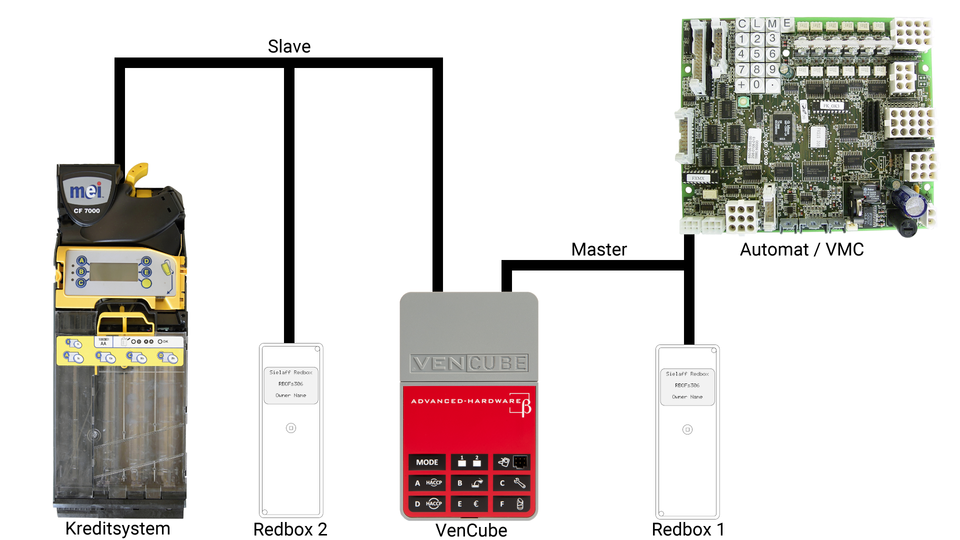
Redbox Anschluß

The Redbox has an MDB plug and an MDB socket on the connection cable. It is simply smuggled in between Vencube and the VMC or between Vencube and the payment systems.
- Redbox 1 for the VMC side (master)
- Redbox 2 for the slave area (slave)

|
Before connecting the Redboxes, the machine must be switched off! |
Tracen
Bedienung
| Funktion des Joysticks der Redbox | |||
|---|---|---|---|
| links | Schritt zurück | 
|

|
| hoch | Menü rauf | 
| |
| runter | Menü runter | 
| |
| rechts | Einstieg in den ausgewählten Menüpunkt | 
| |
| drücken | Einstieg in den ausgewählten Menüpunkt | OK | |
Trace starten
| Redbox für das Tracen aktivieren | ||
|---|---|---|
|
|

|
|
|

|
|
|

|
|

| |
|

| |

|
Das Tracen sollte bei ausgeschaltetem Automaten gestartet werden, weil wir die Aufzeichnung der Einschalt- und Hochlaufphase der MDB-Kommunikation benötigen. |
Auslesen der Redboxen
- Die Redbox mit einem USB-Kabel mit dem PC verbinden.
- Die Redbox wird nun im Explorer als Laufwerk wie ein USB-Stick angezeigt.
- Jetzt auf der Redbox in den Ordner
Tracewechseln. - Alle hier befindlichen Dateien herunter auf den Rechner kopieren.
- Bitte an den Dateien kenntlich machen ob es sich um den Master (Steuerung) oder Slave (Kreditsystem) Trace handelt.
- Jetzt können diese Dateien per E-Mail versendet werden. Beachten sie hierbei bitte, dass bei vielen E-Mail-Diensten eine Dateivolumengrenze von 10MB vorhanden ist.