Antenna exchange at the Vencube
Step 1: Turn off the machine.
Step 2: Unplug all connectors on the Vencube.
Step 3: Remove the Vencube from its holder.
Step 4: Pull the cover off the case by gently pressing on the side of the ribbed area of the cover. (Picture 1)
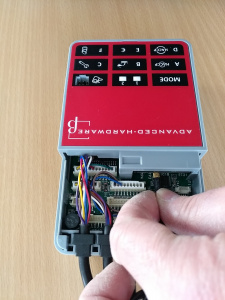
Step 5: Carefully unplug the antenna cable from the connector. To do this, grasp the brass-colored metal part and please do not pull on the cable. (Picture 3)
-
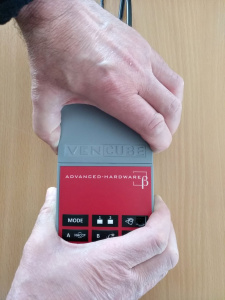
Picture 1: Remove the cover
-
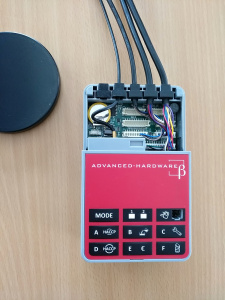
Picture 2: Open Vencube
-
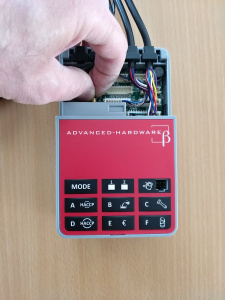
Picture 3: Unplug the cable


Step 6: Plug the new antenna into the socket provided. (Picture 5 and Picture 6)
Step 7: Remove the rubber grommet from the old antenna and place it in the same place as you did with the old antenna. Note that a slight bend must remain in the antenna cable to serve as strain relief. (Picture 7)
Step 8: Slide the lid back onto the Vencube and reinstall it into the machine.
Step 9: After connecting, switch the machine on again.
Step 9: Now check the Vencube for proper function.
-
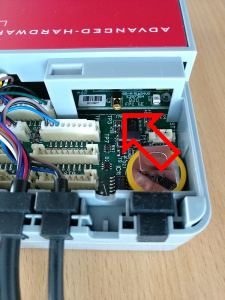
Picture 5: Antenna connection
-
Picture 6: Plug in the cable
-
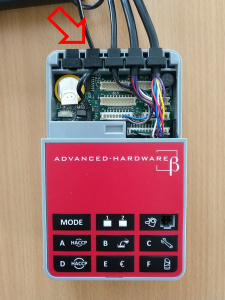
Picture 7: Insert strain relief


