Vencube does not broadcast
Zur Navigation springen
Zur Suche springen
Check antenna
- Switch off the machine and switch it on again after approx. 30 seconds.
- If you do not dial into the network, repeat the process with the machine door wide open.
- If necessary, check whether the antenna is correctly plugged into the VenCube.
- If necessary, the antenna is to be exchanged.
- Switch off the machine, unplug all VenCube cables and remove the VenCube from its holder.
- Remove the SIM card:
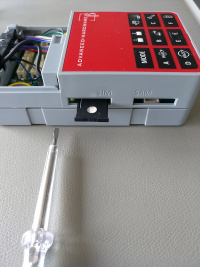
- Using a small screwdriver, gently press in on the yellow eject button next to the SIM card. (picture 3 and 4)
- The SIM card can now be removed. (picture 5 and 6)
- Clean the SIM card contacts with a cloth.
- Insert the SIM card back into the SIM card holder and push it into the VenCube as far as it will go. (picture 7)
- Insert the VenCube into the machine and plug in all the cables.
- Switch the machine on again and wait until the machine dials into the mobile network.
- If there is no network dial-up, the VenCube is faulty and should be replaced.
-
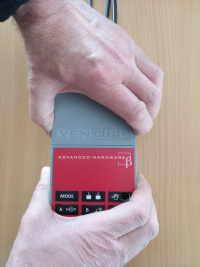
Remove cover (image 1)
-
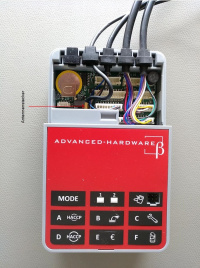
(Image 2)
-
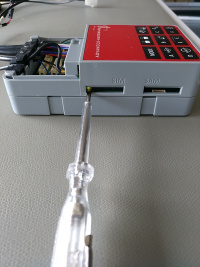
(Image 3)
-
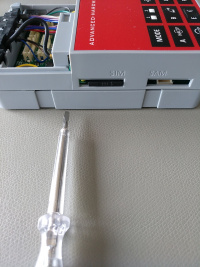
(Image 4)
-
(Image 5)
-
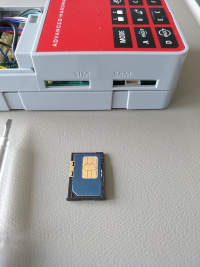
(Image 6)
-
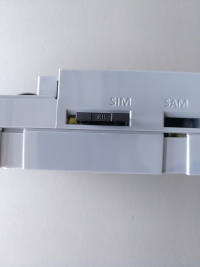
(Image 7)


