|
MDB level from coin changer is not level 3
|
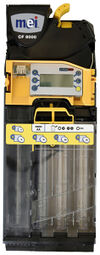
- The level 3 setting applies to all four variants of the 8000 series.
- CF 8200
- CF 8250
- CF 8500
- CF 8550
- Setting
- Press and hold the yellow button on the coin validator for 3 seconds until
Prices is shown on the display.
- Press the D button 3x until
Automation Options appears on the display.
- Press yellow button 1x for
MDB Options and press yellow button again for Change. optimal..
- Press the D button once until
Level is displayed.
- Select
Level menu with yellow and select Level 3 using the D or E button and confirm with yellow.
- Then press the C button until you exit the menu.
Then restart the vending machine. Please wait a few seconds before turning it back on.
|
